
12 AI Video Prompt Examples That Stop the Scroll
12 AI video prompt examples for ecommerce, UGC, real estate, food, and viral hooks, with the exact camera direction and negative prompts that make each one usable.

A product can be perfectly photographed and still look dead when an AI video model is told to “make a cinematic ad.” That vague instruction leaves the model to invent the product angle, lighting, motion, setting, and even the product itself. The best AI video prompt examples do the opposite: they give the model a production brief it can actually execute.
For creators, sellers, agents, and hosts, the goal is not to write more words. It is to specify the few details that control commercial quality: what appears first, how the camera moves, what the subject does, where light falls, and what must not change. That is how you get footage built to stop the scroll instead of another attractive-but-unusable AI clip.
Why generic prompts produce generic video
Compare “a woman using a skincare serum in a luxury bathroom” with a directed prompt that names the product, shot sequence, lens, movement, light, and exclusions. The first might generate a pleasant beauty scene. The second has a fighting chance of producing an ad cut you can actually use.
A useful prompt answers four production questions: what is the hero subject, what action or camera move creates motion, what visual environment supports the message, and what errors the model must avoid.
You do not need to force every model into the same syntax. Veo, Kling, Runway, Seedance, Luma, Pika, and Grok Imagine respond differently. But the creative brief underneath should stay consistent. Build that brief once with the free AI video prompt generators by model, then test a variation when a movement, face, logo, or product detail needs refinement.
AI video prompt examples for revenue-driving content
Eight production briefs below, one per use case. Each one names the hero subject, the camera move, the light, and the exact things that must not go wrong, then explains why that structure is the right call for that format.
1. Ecommerce product reveal
This format works for Shopify stores, Etsy sellers, and Amazon brands that need a premium hero clip from a product image.
Create a 7-second vertical product reveal for a matte black insulated water bottle. Start on an extreme close-up of condensation beads on the bottle surface, then slowly orbit 30 degrees to reveal the full silhouette on a dark stone kitchen counter. Soft morning window light from camera left, subtle cool rim light, shallow depth of field, 85mm product-commercial look. Keep the bottle proportions, black finish, lid shape, and logo placement accurate to the reference image. No warped text, no extra bottles, no hands, no floating objects, no logo changes.
The camera move is intentionally simple. An orbit lets the product feel dimensional without asking the model to coordinate a hand, a pour, and a complicated transition in one short generation.
Shopify, Etsy & Amazon video generator
Paste a listing URL and get a product-video prompt built from the real listing photos, no reshoot needed.
2. UGC-style skincare ad
UGC needs to feel native to social feeds, not like a glossy beauty campaign pretending to be a customer review.
Vertical 9:16 selfie-style video of a woman in her late 20s standing near a bright bathroom window, holding a small glass facial serum bottle toward the camera. She smiles naturally, applies one drop to her cheek, then looks at her skin in the mirror with a believable satisfied expression. Handheld phone-camera movement, slight natural micro-shake, clean morning daylight, casual lived-in bathroom, realistic skin texture. Product label remains readable and consistent. Avoid beauty-filter skin, distorted fingers, duplicate bottles, text overlays, and exaggerated influencer acting.
For paid social, make several versions with different opening actions. A bottle close-up, a visible before-and-after reaction, and an immediate application shot can each perform differently in the first two seconds.
AI UGC Video Generator
Build the same handheld, native-feeling ad for your own product without a creator shoot.
3. Food product texture shot
Food is unforgiving. If the steam, texture, or pour looks wrong, viewers notice instantly.
Cinematic macro food video of warm maple syrup pouring slowly over a stack of golden pancakes topped with blueberries and a small pat of melting butter. Begin with a tight 100mm macro shot of syrup hitting the pancakes, then make a slow push-in as steam rises naturally. Warm side lighting, dark rustic breakfast table, shallow depth of field, high-end restaurant commercial style. Keep the food appetizing and physically believable. No plastic-looking food, no extra utensils appearing, no syrup flowing upward, no melted or misshapen blueberries.
A macro shot is a smart choice when the product itself is the proof. Pairing it with a slow push-in turns texture into the story without needing a full kitchen scene.
4. Apparel try-on with controlled movement
Fashion clips fail when garments morph between frames or the model’s body changes shape. Keep the action narrow and make the clothing the hero.
Create a 6-second vertical fashion try-on video featuring a woman wearing an oversized cream linen button-down shirt and straight-leg light-wash jeans. She stands in a bright minimal loft, turns slowly from front view to three-quarter profile, then lightly adjusts one shirt cuff. Full-body framing, camera at waist height, 50mm lens, soft diffused daylight, neutral editorial ecommerce styling. Preserve the shirt's button placement, linen texture, sleeve length, and cream color. No clothing changes, no extra limbs, no changing facial features, no warped hands, no runway walk.
If a single clip cannot hold garment consistency, generate separate front, side, and detail shots. Edit them together rather than demanding a complex, continuous performance.
5. Real estate exterior arrival shot
A listing video should establish curb appeal quickly, then give buyers a reason to keep watching. Avoid impossible drone moves that distort rooflines or turn landscaping into mush.
Create a 10-second cinematic exterior video of a modern two-story suburban home at golden hour. Begin low at the edge of the driveway and make a slow, stabilized gimbal push toward the front entry, rising slightly to reveal the facade, landscaping, and warm interior window glow. Wide 24mm real-estate lens look, accurate straight architectural lines, natural tree movement in a light breeze, polished but realistic color grade. Preserve the home's actual roofline, windows, driveway, and landscaping from the reference photo. No added rooms, no warped siding, no dramatic storm clouds, no people or vehicles.
This is often more credible than a synthetic aerial. A controlled gimbal arrival shot can replace a costly opening sequence while keeping the actual property recognizable.
AI Real Estate Video Generator
Turn a listing's exterior photo into the same golden-hour arrival shot, roofline and all.
6. Short-term rental lifestyle moment
For Airbnb and Vrbo properties, sell the feeling of staying there without inventing amenities that do not exist.
Vertical lifestyle video inside a cozy mountain-cabin rental. A couple in casual weekend clothing places two mugs of coffee on a wooden table beside a large window overlooking pine trees. The camera makes a slow lateral slide past the mugs toward the view, with soft early-morning light and gentle fireplace glow in the background. Warm, calm, premium travel-ad feel. Keep the room layout, window placement, furniture, and mountain view faithful to the property photos. No extra bedrooms, no snow unless visible in the reference, no distorted hands, no fake luxury upgrades.
Property prompts should be grounded in source photography. Beautiful footage that misrepresents the rental can create guest disappointment and listing problems. The same real estate video generator handles both agent listings and host lifestyle clips.
7. App or SaaS concept ad
Software is invisible, so the prompt needs a visual metaphor that supports the message without becoming a generic floating-interface cliché.
Create a 7-second vertical ad for a small-business scheduling app. A busy salon owner stands behind a reception desk as appointment cards on a tablet organize themselves into a clean daily schedule. Start over her shoulder with the tablet in focus, then rack focus to her relaxed expression as she picks up a cup of coffee. Bright modern salon, natural daylight, realistic tablet screen, polished commercial camera movement. No unreadable interface text, no floating holograms, no warped hands, no rapidly changing screen layout.
Use the generated video as the emotional setup, then add real screen recordings and readable captions in editing. If the metaphor needs its own backdrop rather than a real location, the free scene generator builds the environment prompt for you. AI video is strong at atmosphere and action. It is not the place to trust tiny UI copy.
8. Creator hook for a viral product clip
A short-form hook should deliver an unusual visual immediately, then resolve it before the viewer swipes away.
Vertical 9:16 video of a compact portable blender on a clean white kitchen island. In the first second, frozen strawberries and ice cubes fall in slow motion into the open blender cup. The lid clicks into place, the blender starts, and the camera makes a fast but smooth push toward the swirling bright-red smoothie. Crisp high-key lighting, energetic creator-ad style, 35mm lens, realistic ingredient physics. Keep the blender design and color accurate. No ingredients missing the cup, no splashing outside the blender, no deformed lid, no unreadable product branding.
The action is easy to understand with sound off. That matters because many social viewers will see the first frame before they hear anything.
Viral Hooks Library
Browse 10 ready-made 3-second hook prompts built on this exact instant-payoff pattern.
Turn a basic idea into a production brief
When your raw idea is only “show my candle in a cozy room,” build it in this order: identify the hero product, choose one action, choose one camera move, set the lighting and location, then name the non-negotiables. Add negative prompts only for errors that would make the asset unusable, such as distorted labels, altered packaging, extra fingers, incorrect architecture, or text glitches.
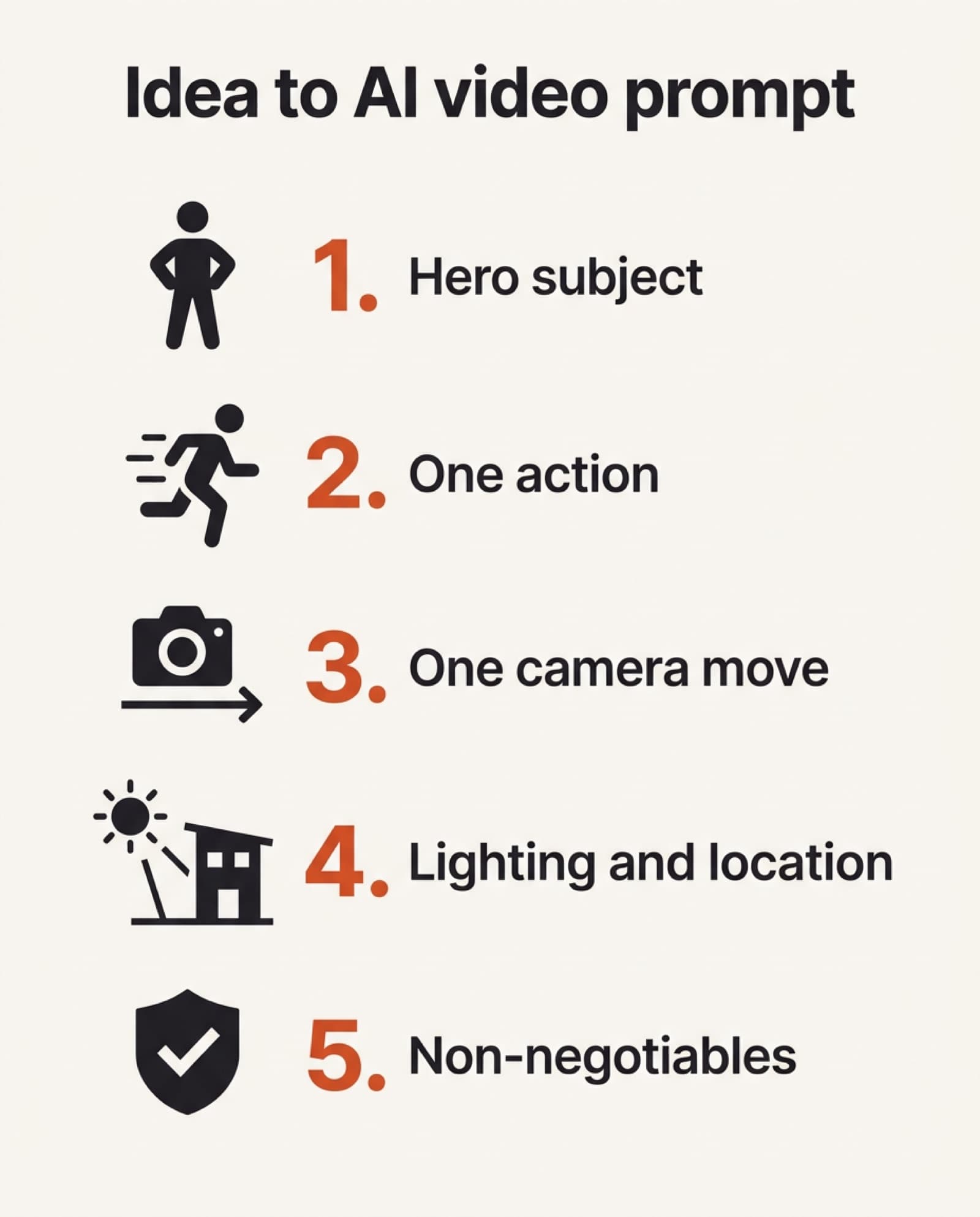
Free AI Video Hub is built around that exact shift from loose idea to cinematographer-level brief. The per-model prompt generators start with the decisions your use case already requires instead of a blank text box, so you are not repeatedly rewriting the same generic sentence.
The final test is simple: if someone watched the clip with no context, would they know what they are supposed to notice, feel, or buy in the first two seconds? If not, tighten the opening shot before you generate again.
AI Video Prompt Generators by Model
Pick your model and build your own structured prompt from scratch, free and no signup.
Frequently asked questions
What makes an AI video prompt example actually usable, versus just pretty?
It answers four production questions: what the hero subject is, what single action or camera move creates motion, what environment supports the message, and what errors the model must avoid. A prompt that only describes mood ("make it cinematic") leaves all four decisions to the model's defaults, which is why it produces attractive-but-unusable footage.
How long should an ecommerce product reveal prompt be?
Long enough to lock the product's proportions, finish, and branding, and short enough to ask for one camera move. The example above uses one move (a 30-degree orbit) and one lighting setup, then spends the rest of the prompt on what must not change: bottle proportions, lid shape, and logo placement.
Why do apparel and fashion AI video prompts fail so often?
Because garments and body shape are the hardest things for a video model to hold steady across a continuous performance. If a single clip cannot keep the garment consistent through a turn, generate separate front, side, and detail shots instead and edit them together, rather than asking for one long, complex action.
What negative prompts should every real estate AI video include?
No added rooms, no warped siding or rooflines, no invented amenities, and no dramatic weather or people that were not in the reference photo. Real estate and short-term rental prompts should stay grounded in the actual listing photos, since footage that misrepresents the property creates buyer or guest disappointment later.
How do I turn a vague idea into a production-ready AI video prompt?
Work in order: identify the hero subject, choose one action, choose one camera move, set the lighting and location, then name the non-negotiables as negative prompts. Add negative prompts only for errors that would actually make the asset unusable, not every possible flaw.
Do I need different prompts for Veo, Kling, Runway, and Sora?
The syntax each model responds best to differs, but the underlying creative brief should not. Keep the same hero subject, action, camera move, and negative list, then adjust phrasing per model with the free AI video prompt generators by model.
Keep reading
How an AI Video Prompt Generator Gets Better Shots
A generic prompt gets generic footage. The four-layer brief (composition, cinematography, art direction, control) that turns a rough idea into a shot a video model can actually follow.
Read moreHow to Turn Product Photos Into a Video (Free, No Filming)
Use a photo as a reference frame and let AI build a short 3-5s clip around it. The method, the prompt formula, and three prompts you can copy.
Read moreDolly Zoom: How the Vertigo Effect Works (and How I Faked It With AI)
Hitchcock needed a dolly track and a rehearsed crew. I needed a prompt. An interactive breakdown of how the vertigo effect works, plus the experiment that got AI models to stop faking it with a plain zoom.
Read more