
I Made an AI Video of Myself at the World Cup, and My Friends Believed It
I couldn't afford World Cup tickets, so I built a free AI tool that puts your face in the stadium. The exact prompt method, and how my friends got fooled.
The short version
I couldn't afford to go to the World Cup, so I built a free tool that puts my face in the stadium instead. You upload one selfie, pick your team, a real 2026 host stadium, and a moment — lifting the trophy, sprinting onto the pitch, going candid in the stands — and it writes the long, structured AI video prompt that makes the clip look real, plus the two reference images you feed the video model. I made a few to prank my group chat. Some of my friends thought they were real. Then I launched it.
This is the story of how it works and how to make your own — the prompt, the stadium database, and the one starting image everything is built from. It's free and needs no signup; the rest of this post is what's happening under the hood so you can steer it.
I'd spent three months making AI videos for ad creatives
Before any of this was about football, it was my job. For about three months I'd been making AI UGC ads — short, face-driven clips of “real people” talking about a product — the same kind of thing I write about in turning photos into video. I ran the same shot through Kling, Veo, Runway and SeeDance over and over, and the lesson never changed: the model is almost never the bottleneck. The prompt is. A vague prompt gives you uncanny, plastic AI slop in any model; a long, specific, structured one gives you something a stranger scrolling past can't tell from a phone video.
That's the whole reason this tool exists. I already knew the exact shape of prompt that makes a face-driven clip believable — I just pointed it at a stadium instead of a product.
Then the World Cup came, and I couldn't afford to go
The 2026 World Cup landed on my doorstep — matches across the US, Canada and Mexico — and tickets, flights and hotels were never going to happen on my budget. Everyone in my group chat was posting where they'd be. I had nowhere to be. So instead of paying thousands to stand in a stadium, I spent an evening pointing my UGC-ad prompt formula at a photo of my own face and a photo of a stadium, to see if I could fake being there convincingly enough to wind up my friends.
So I built it to prank my friends — and they fell for it
I dropped a clip of “me” in the stands at a packed World Cup match into the group chat with zero context. No “look what AI can do” — just the video, like I was actually there. The replies came in fast: where are you, who did you go with, how did you get tickets. A couple of people didn't question it at all. That moment — watching friends who know me argue about whether it was real — is the entire reason I turned the prank into a tool other people could use.
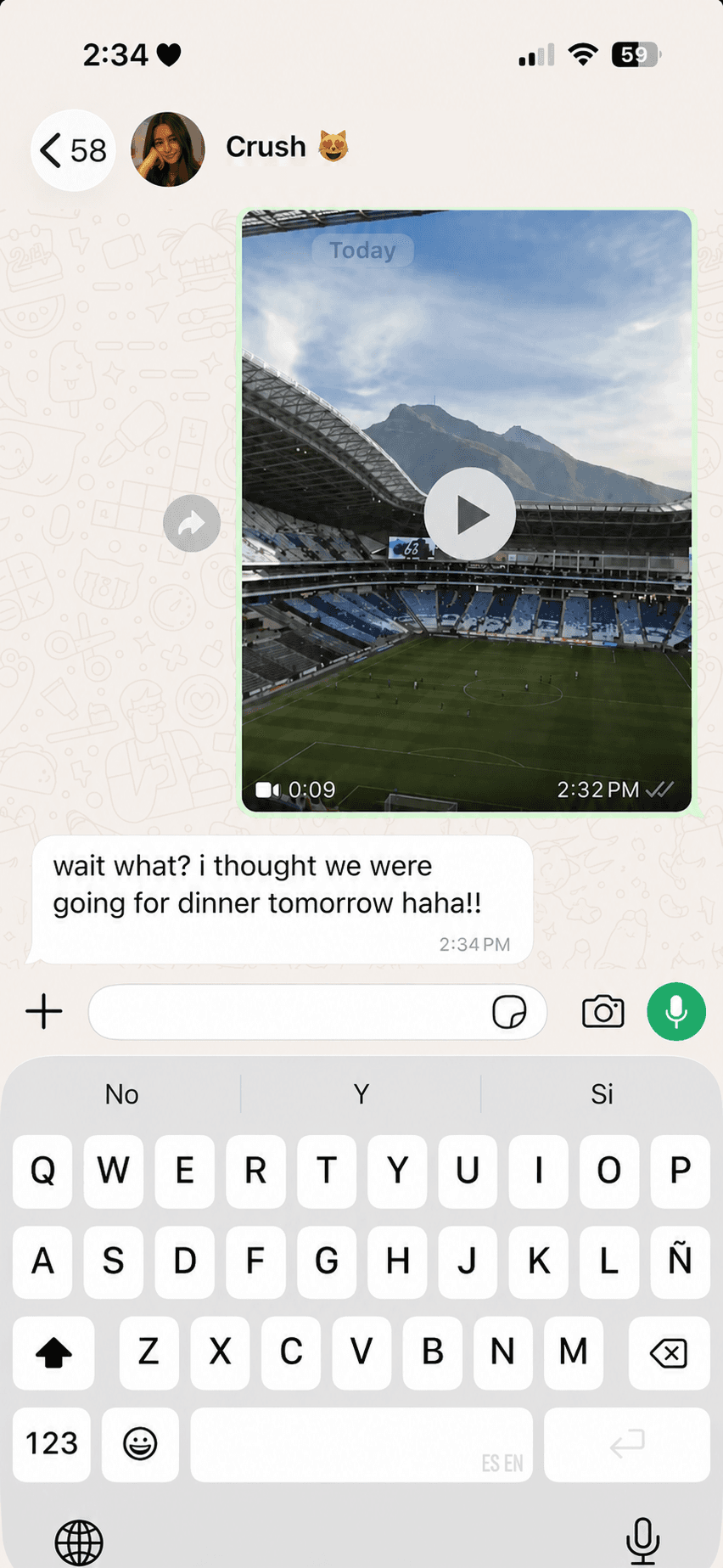
I cleaned it up, added the team and stadium pickers, and put it online. I launched it yesterday and shared it across three subreddits — within 24 hours it had pulled over 7,000 views, and the top replies weren't “cool,” they were “wait, how did you do this?”

Turns out I wasn't alone: the fake-stadium-video wave
While I was doing this for laughs, the same idea was quietly going viral at a scale I hadn't clocked. During the 2026 World Cup, AI-generated clips of people in the stands have pulled hundreds of millions of views, with huge numbers of viewers convinced they were watching real broadcast footage. The trend reportedly started earlier in the year with an AI clip of a woman at a South Korean baseball game, and broadcasters have since covered it as a genuine misinformation problem.
Fact-checkers spot the fakes by small tells — a match clock frozen the whole clip, a broadcaster logo for a game that network never aired, slightly robotic audio. One widely shared video was rated 99.9% likely AIby detection tooling and traced to a commercial generator. I think that's exactly why being open about how this works matters — which is the last section of this post. The point of my tool is a laugh in the group chat, not passing a fake off as news.
How it actually works, in three steps
Under the friendly three-tap interface, the tool is doing one hard thing for you: writing a prompt you would not want to write by hand. Here's the whole pipeline.
1. Upload your face
One clear, front-facing selfie. This becomes the single source of truth for who you are — referenced in the prompt as @img1. The video model reads your features from it and is told to preserve them above everything else, so the person in the clip is unmistakably you and not a generic player.
2. Pick team, stadium and moment
Choose a national team (it knows the kit colours), one of 16 real 2026 host stadiums, and one of eight moments. Those choices get injected into a hand-tuned template — the right kit, a contrasting opponent colour, the named venue, and the stadium photo as @img2.
3. Get the prompt + two reference images
In about 30 seconds you get a long, structured video prompt and the two images you feed the generator: your face (@img1) and the exact stadium (@img2). Paste the prompt into the AI video studio we link to, Kling, Veo or Runway, attach the two images, and render your clip.
Why it's all about the prompt
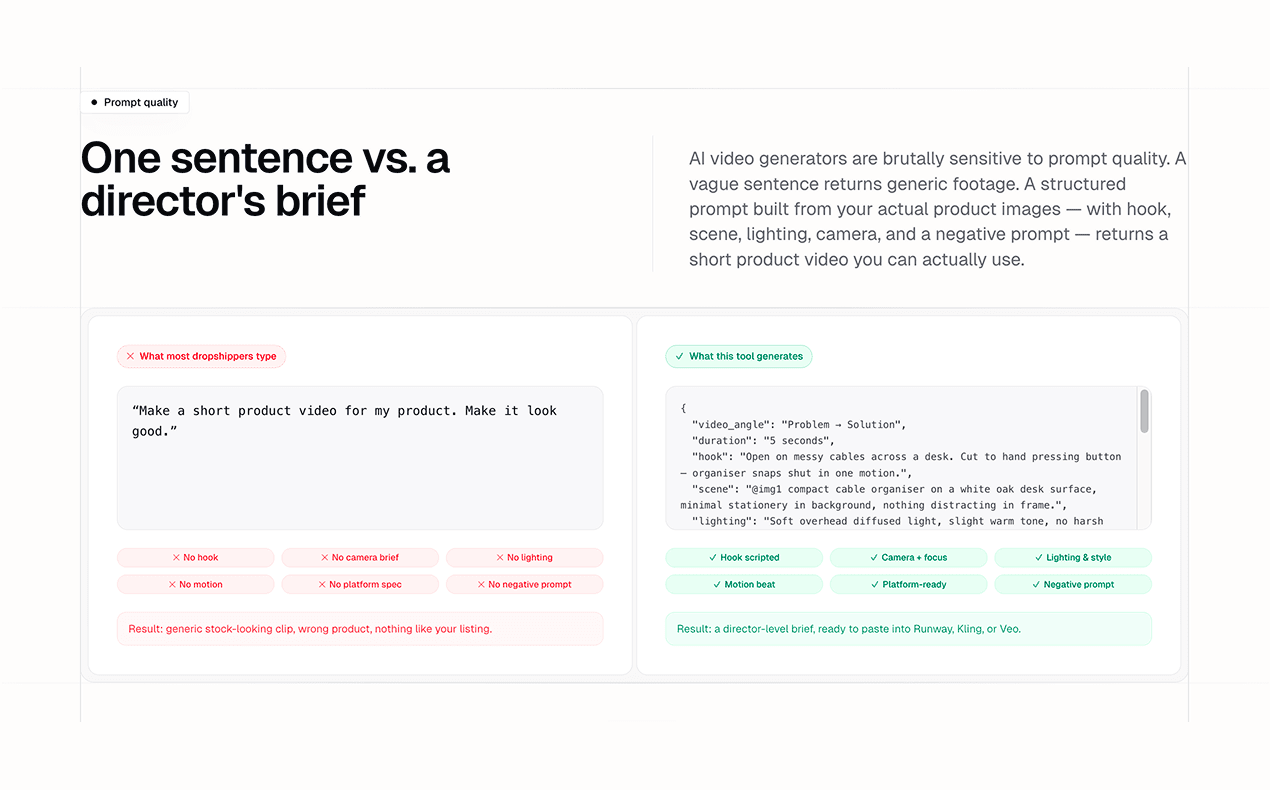
Here is the part most people get wrong: a believable stadium clip does not come from a clever model, it comes from a brutally detailed prompt. Not a sentence — a few hundred words of structured JSON that nails the camera, the crowd, the lighting, the exact thing your body does, and a long list of what the model must not do. Almost nobody wants to write that from a blank page, which is the entire reason the tool exists: it starts you from a prompt that already works, and you tweak.
Here it is in black and white — the one-liner most people type next to the structured brief the tool writes for the same idea. Feed a model the left and you get generic, plastic footage; feed it the right and it has something to actually work from.
Anatomy of the prompt
This is what the tool actually hands you — a few hundred words of structured JSON. Here's a real one straight from the generator, for the team-walkout scenario:

It ships minified to stay under the model's length limit. Let's pretty-print the “inside the stadium” template — a phone selfie that flips from the pitch to your face — so we can walk through what each part is doing:
Raw smartphone selfie video recorded by a football fan during a live match.
Preserve identity from @img1 first. Match stadium appearance from @img2 second.

{
  "title": "Stadium Selfie With Camera Flip",
  "type": "single_shot",
  "duration": "8-12s",
  "priority": "Preserve identity from @img1 first, smartphone realism
               second, match stadium from @img2 third.",
  "camera": { "device": "recent iPhone", "orientation": "vertical 9:16",
              "fps": 60, "stabilization": "natural smartphone only" },
  "references": { "person": "@img1", "stadium": "@img2" },
  "scene": { "location": "upper seating of a packed stadium",
             "crowd": "full stadium", "lighting": "real stadium lighting" },
  "action_sequence": {
    "phase_1": { "duration": "3-4s", "camera_view": "rear camera",
                 "action": "slow handheld pan across the stadium" },
    "phase_2": { "duration": "0.2-0.5s", "action": "tap the camera-flip button" },
    "phase_3": { "duration": "5-7s", "camera_view": "front camera",
                 "action": "you film yourself, the bowl opening up behind you" }
  },
  "style": { "look": "real fan-recorded Instagram Story",
             "realism": "indistinguishable from authentic phone footage" },
  "negative_prompt": [ "phone visible in frame", "identity drift from @img1",
    "different stadium than @img2", "beauty filter", "plastic skin",
    "extra fingers", "cinematic movie shot", "drone shot" ]
}
Every section is doing a job. These are the ones that decide whether it's believable:
priority — identity first, always
The very first instruction locks the person to @img1 above realism and even above the stadium. This single ordering is what stops the model from drifting your face into a generic stranger halfway through the clip.
references — your two anchors
{ "person": "@img1", "stadium": "@img2" }. The two images you upload aren’t decoration — the prompt points at them by name so the model keeps your face and the real venue instead of inventing both.
camera — a phone, not a film crew
The fakes that fool people look like a phone, not a movie. So the template asks for a recent iPhone, vertical 9:16, 60fps, natural handheld shake — and the negative list explicitly bans 'cinematic movie shot' and 'drone shot'. Realism is mostly the absence of polish.
action_sequence — beats with timecodes
In 8–12 seconds you get a few beats, each with a duration and a camera view — a rear-camera pan, the camera-flip, then the front-camera reveal. Telling the model exactly when each thing happens is what keeps the motion coherent instead of a soup of movement.
negative_prompt — the longest, most important list
The highest-leverage part, and the part people skip. 'phone visible in frame', 'identity drift from @img1', 'plastic skin', 'extra fingers', 'beauty filter' — banning the artefacts that scream AI does more for realism than any positive description.
The detail almost everyone misses
All eleven US venues are NFL stadiums, so the prompt quietly tells the model to convert the field into a real football pitch: add a regulation goal and netting at each end, repaint the FIFA markings (centre circle, penalty boxes, spots, corner arcs) and strip the American-football yard lines and end zones — while keeping the stands and roof exactly as they are in @img2. That one instruction is the difference between “at the World Cup” and “at a random NFL game.”
And here's what that inside-the-stadium template actually produces — your face, the packed bowl behind you, the phone-camera look the prompt asks for:
The two things that make it believable
1. A strong starting image — your face in the frame
Image-to-video models build every frame out of what they start from, so the whole clip is only as convincing as the face you give it. One clear, evenly lit, front-facing selfie beats a moody, half-shadowed one every time — the model has more of your actual features to hold onto, so your identity survives all the way to the last frame. Your face is the anchor; the stadium is the backdrop the prompt wraps around it.
2. A real stadium, not a hallucinated one
This is why the tool keeps its own database of the actual 2026 host venues. Instead of letting the model guess what a stadium looks like, it hands over a real photo of the one you picked as @img2 and tells the model to match it. That's also why you get two reference images back, not one — your face and the venue — because both have to be pinned for the clip to read as real.
| Stadium | City | Host |
|---|---|---|
| MetLife Stadium | New York / New Jersey | USA |
| SoFi Stadium | Los Angeles | USA |
| AT&T Stadium | Dallas | USA |
| Mercedes-Benz Stadium | Atlanta | USA |
| NRG Stadium | Houston | USA |
| Arrowhead Stadium | Kansas City | USA |
| Lumen Field | Seattle | USA |
| Levi's Stadium | San Francisco Bay Area | USA |
| Gillette Stadium | Boston | USA |
| Lincoln Financial Field | Philadelphia | USA |
| Hard Rock Stadium | Miami | USA |
| BMO Field | Toronto | Canada |
| BC Place | Vancouver | Canada |
| Estadio Azteca | Mexico City | Mexico |
| Estadio BBVA | Monterrey | Mexico |
| Estadio Akron | Guadalajara | Mexico |
Sixteen real venues across the three host countries — pick yours in the World Cup video generator.
Make your own, step by step
- Take one clear selfie. Front-facing, even light, your whole face visible. This is the @img1 your identity is locked to.
- Open the tool and pick your scene. In the World Cup video generator, choose your team, a stadium, and a moment — trophy lift, pitch invasion, candid in the stands, and five more.
- Generate the prompt. In about 30 seconds you get the structured JSON prompt plus your two reference images (face + stadium). Add any special request — night match, rain, a number 10 on your back.
- Render it in a video model. Paste the prompt into the AI video studio we link to, Kling 3.0, Veo 3.1 or Runway, attach @img1 and @img2 in order, and generate a 5-second vertical clip.
- Generate two or three and keep the best. AI video is cheap to retry. Re-roll the seed or nudge one line of the prompt and keep the take that holds your face the whole way through.
Is this allowed? It's AI — here's how to spot it
Keep it fun, and keep it honest.
This is a toy for your group chat, not a way to pass a fake off as real news. The difference between a harmless prank and the misinformation broadcasters are worried about is one thing: whether you're honest that it's AI.
- Label it.Add “AI” to the caption, or leave the platform's AI-content tag on. The joke still lands when people know it's fake.
- How to tell one's AI:a match clock that never moves, a broadcaster logo for a game that wasn't aired, slightly robotic audio, hands or crowds that warp if you look closely.
- Don't use someone else's facewithout their okay, and don't stage anything designed to deceive or harm. Use your own face, or a willing friend's.
What three months and a dumb prank taught me
The realism never lived in the model. It lived in a few hundred words of prompt — identity locked to one photo, a real stadium pinned as a reference, a phone-camera look, and a long list of what not to do. I spent three months learning that on ad creatives; the World Cup just gave me a funnier way to prove it. If your AI clips look fake, it's almost never the model. It's the prompt — so start from one that already works and make it yours.
Not affiliated with or endorsed by FIFA or the FIFA World Cup. Team and stadium names are used for identification only and belong to their respective owners. Videos made with this tool are AI-generated; please label them as such.
Frequently asked questions
How do I make an AI video of myself at the World Cup?
Upload one clear selfie, pick your team, a real 2026 host stadium, and a moment, like lifting the trophy or running onto the pitch. The free World Cup video generator writes a long, structured AI video prompt and hands you two reference images (your face and the stadium). You then render the 5-second clip in the AI video studio we link to, Kling, Veo, or Runway. The whole prompt step takes about 30 seconds and needs no signup.
Is the World Cup AI video tool free?
Yes. Writing the prompt is completely free and needs no account. Generating the final video happens in an AI video model; the AI video studio we link to has a free tier and is the cheapest way to render it, but you can paste the prompt into Kling, Veo, or Runway instead.
Why does the prompt have to be so long?
Because realism lives in the detail. A one-line prompt gives you uncanny, plastic AI footage in any model. The tool writes a few hundred words of structured JSON (camera, crowd, lighting, the exact action, and a long list of what the model must not do), which is what makes the clip read as a real phone or broadcast video. Most people don't want to write that from scratch, so the tool starts you from a prompt that works and lets you tweak it.
Do I need to upload my face?
Yes. The whole point is to put you in the scene. The tool reads your selfie and writes the prompt to preserve your exact likeness, referenced as @img1. When you render in a video model you attach the same photo as the identity reference so the person in the clip is unmistakably you.
Which teams and stadiums can I pick?
Major national teams (Argentina, Brazil, France, England, Spain, Mexico, USA, Morocco and many more) and the real 2026 World Cup host stadiums across the USA, Canada, and Mexico, from MetLife Stadium to the Estadio Azteca. The tool keeps a photo of each venue so the model matches a real stadium instead of inventing one.
Are these AI World Cup videos real, and is it OK to post them?
They are AI-generated, not real footage, and during the 2026 World Cup, fake stadium clips that pull hundreds of millions of views have become a genuine misinformation concern. Keep it fun: use your own face, label the video as AI, and don't pass it off as real news. Posting an obviously-AI clip of yourself lifting the trophy for a laugh is fine; deceiving people is not.
Keep reading
Image to Video AI: How to Turn Any Photo Into a Video (Free)
A beginner's guide to free image-to-video AI: start from a real photo (especially for faces), the motion-prompt formula, and why SeeDance 2.0 beats Kling, Veo, Grok, and Midjourney.
Read moreHow to Make a Talking Dog Video for Free (the 'I'mma Bite You' Meme)
The behind-the-scenes method: I had Gemini watch the viral clip and write the prompt that recreates it, with no motion software and no $40/month tool. How to replicate it free with your own dog.
Read more