
How to Make an AI Drama Series (What 17 Creators Actually Agree On)
We watched 17 tutorials on making AI micro-dramas and pulled out the 5-step workflow every one converges on, the real market numbers, and the failure modes nobody's thumbnail shows.
The short version
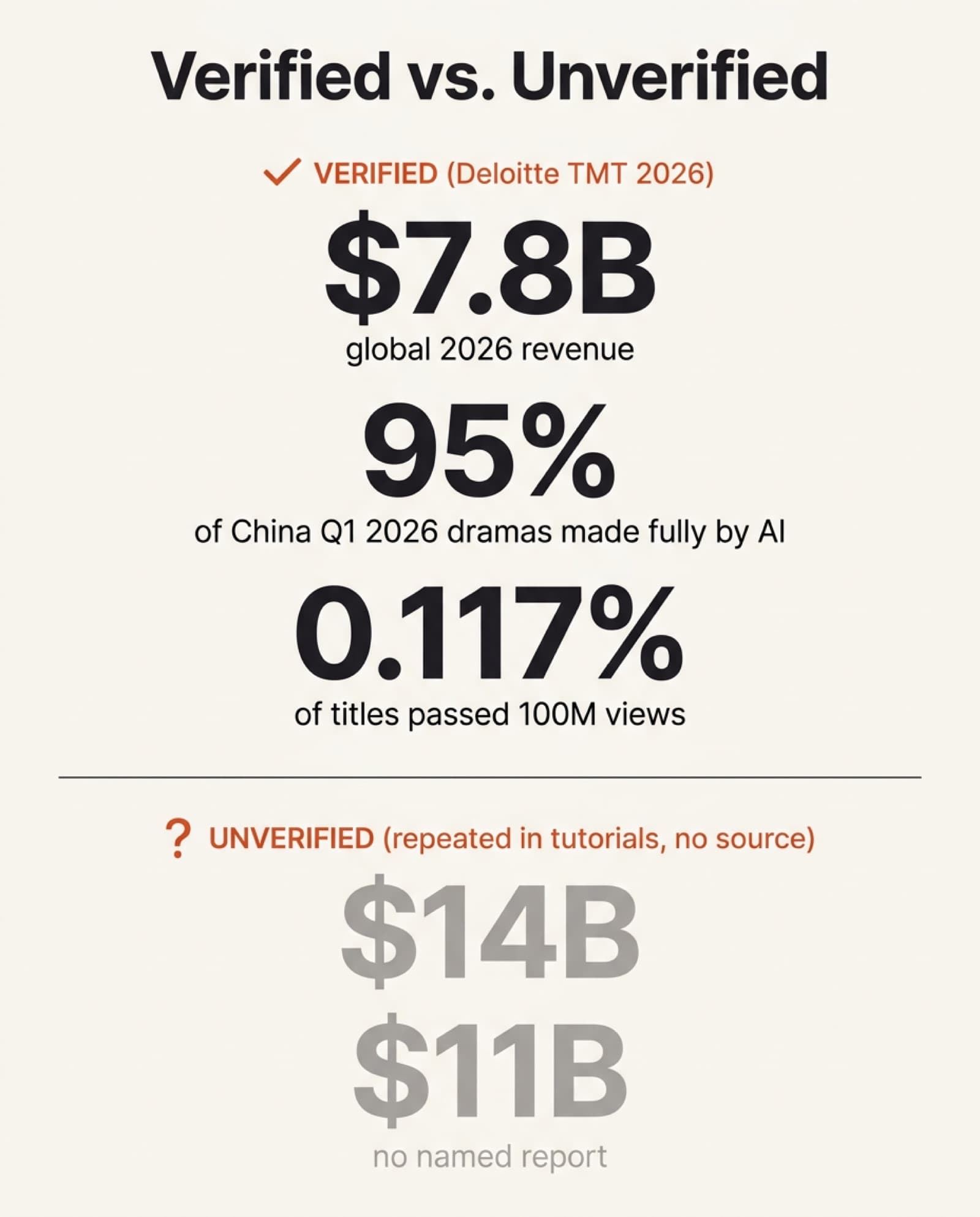
An AI micro-drama, also called an AI drama series, is a 60-to-90-second vertical episode, part of a serialized season, made entirely with AI: no actors, no cameras, no sets. Deloitte forecasts $7.8 billion in global revenue from AI-produced micro-dramas in 2026, more than double 2025, and 95% of the 128,000 micro-dramas released in China in Q1 2026 were made entirely with AI, per the same Deloitte report. We watched 17 tutorials on how creators actually build these (tools ranging from InVideo Agent to OpenArt Director to a plain Claude prompt) and pulled out what they genuinely agree on, where they disagree, and the specific numbers worth trusting versus the ones that don’t hold up.
The workflow every tutorial converges on is the same five steps: write the script with an LLM, lock character sheets before anything else, storyboard before spending video credits, generate scene by scene, then stitch and caption. The tool names change. That sequence doesn’t.
What an AI micro-drama actually is
A micro-drama is short, vertical, serialized storytelling built for mobile: episodes usually under 90 seconds, released in parts, each one ending on a cliffhanger. The format originated in China as duanju, and the mechanic behind why it works has a name, the Zeigarnik effect, the well-documented finding that people remember unfinished tasks better than finished ones. End on a cliffhanger and the viewer’s brain keeps working on it after the video stops.
An AI micro-drama is the same format with every visual element generated rather than filmed. That’s the part that changed in the last 18 months: the format existed for years with real actors, and what’s new is that the entire production pipeline, script, cast, sets, and footage, can now run through AI tools end to end.
The real numbers behind the hype
Market-size claims for this format range from $1.5B to $14B depending on who’s counting and what they’re counting, and not every number that gets repeated in a tutorial actually traces back to research. Here’s what we could verify, and what we couldn’t:
| Figure | Source | Status |
|---|---|---|
| $7.8B global 2026 revenue, up from $3.8B in 2025 | Deloitte TMT Predictions 2026 | Verified directly |
| $1.5B US-only 2026 revenue; 66M US viewers in 2025 | Omdia estimate, cited in an app-development tutorial | Creator-reported, not independently checked this pass |
| “$14 billion” / “$11 billion” format-wide | Two different tool-tutorial channels, no report linked | Unverified, treat as marketing color |
| Only 0.117% of AI dramas in distribution passed 100M cumulative views | Deloitte TMT Predictions 2026 | Verified directly |
It’s a hit-driven business, mostly flops, same as regular content. The one industry insider we found in this stack of tutorials, production-company CEO An Chan of AR Productions, put a number on it in a podcast interview: platforms “will tell you within 24 hours whether it’s a hit,” a hit micro-drama has a shelf life of roughly “6 to 8 months” before it moves to secondary windows, and among the top 10 platforms in any given period, “30 to 40% you won’t see them again.” That’s a far more honest picture than any single revenue figure.
The workflow every tutorial converges on
Strip away the branding and 8 of the 17 tutorials we reviewed independently arrive at the same five-step pipeline, in the same order, using completely different tools. That convergence is the actual finding here, not any one channel’s specific workflow.
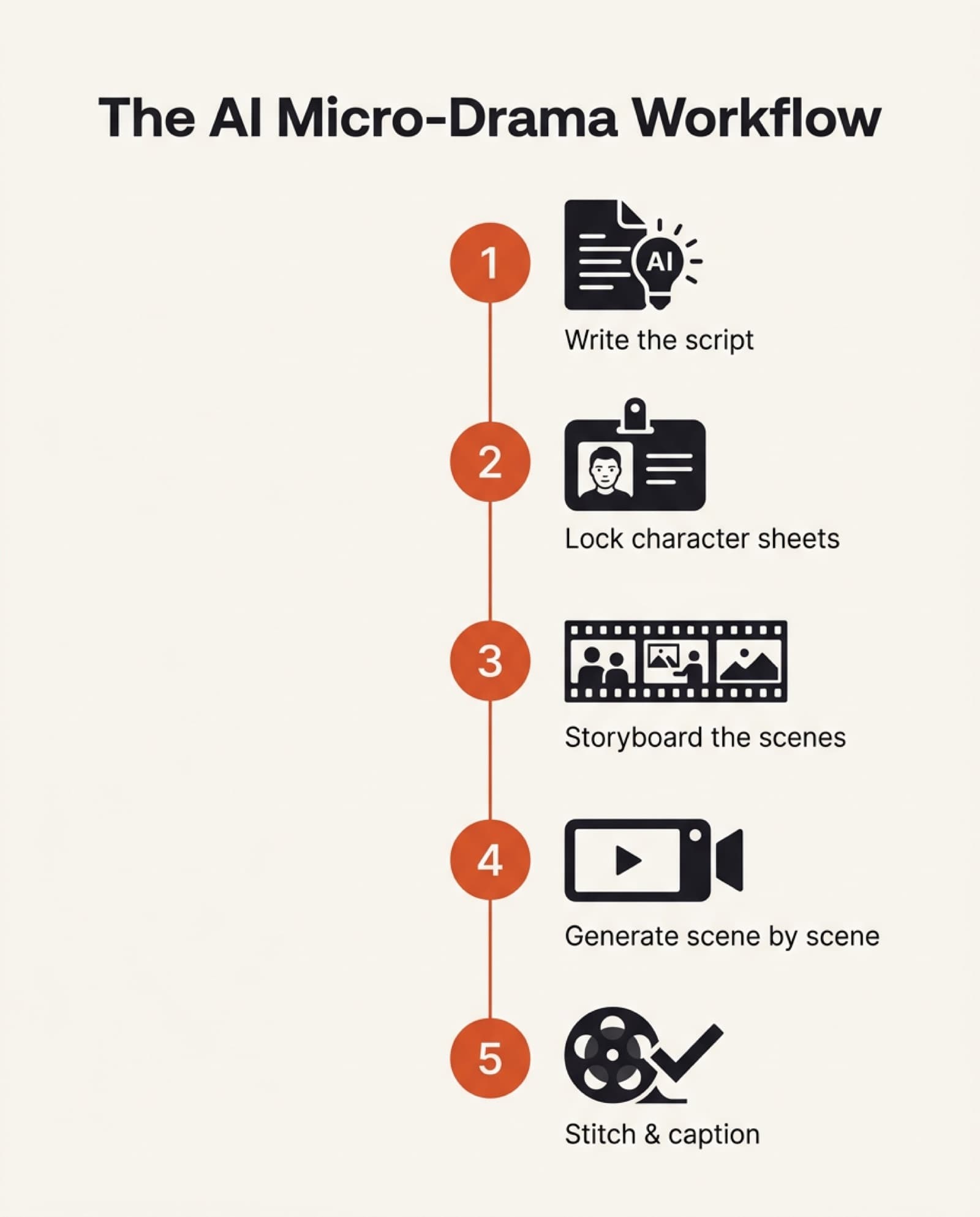
- 1. Write the script with an LLM firstClaude, ChatGPT, or Gemini turns a one-line idea (or a full novel) into a structured script with scenes, dialogue, and episode breaks. Kai Prompt runs this through a custom system prompt; InVideo Agent calls it a “Bible” file that carries the whole season’s context.
- 2. Lock character sheets before anything elseGenerate every main character’s reference sheet (front, side, close-up) and approve it before a single scene renders. AI Century, Danish Sofi, CyberJungle, Isa does AI, and AI Video School all treat this as the non-negotiable first production step, not a nice-to-have.
- 3. Storyboard before spending video creditsGenerate still images of each scene first, image generation runs close to free on most platforms, and only convert to video once the shot sequence is approved. Kai Prompt notes character/scene images cost zero credits on Google Flow; video is where the real spend happens.
- 4. Generate scene by scene, attaching the locked references every timeEach shot re-attaches the approved character sheets and location images, using video models named repeatedly across the set: Seedance 2.0/2.5, Kling 3.0 Omni, and Veo-based options. InVideo Agent and OpenArt Director automate the re-attachment step; several tutorials warn this is exactly where drift creeps in if you skip it.
- 5. Stitch, caption, and add grainClips get joined in CapCut, Premiere, or a built-in editor, captioned (most viewers watch muted), and finished with a subtle film-grain pass. Two separate season-scale tutorials call this out specifically: it “softens the digital edges” and makes the cut read as less obviously AI-made.
The tools, compared
No single tool covers all five steps well today. Every workflow we reviewed combines at least three separate tools: one for scripting, one for character/scene images, and one for video, sometimes glued together by an agent that automates the handoffs between them.
| Tool / channel | Category | What it's for |
|---|---|---|
| Kai Prompt (custom Claude workflow) | Scripting | A custom system prompt that turns a premise into a structured, multi-episode script and keeps character/location notes consistent across the season. |
| InVideo Agent | All-in-one agent | Automates script → character sheet → scene → video in one pipeline; the source of the documented three-people, three-day, $10K season case study below. |
| OpenArt Director | Character + video direction | “Vibe directing”: scene generation with native audio and reference attachment, favoring performance over TTS consistency. |
| AI Century | Character sheets + video | Dedicated character-sheet-locking tutorials, plus hands-on Seedance 2.0 scene generation walkthroughs. |
| HitPaw Edimakor | Editing | Stitching, captioning, and the film-grain finishing pass on the assembled cut. |
| Sky Reels | Video generation | Scene-generation model covered specifically for its character-reference handling. |
| TopView AI Filmmaking Academy | All-in-one agent | Course-style, end-to-end walkthrough covering the same five-step spine as a guided curriculum rather than a single tool. |
Character consistency, explained
Character drift happens because every AI video generation is stateless: the model has no memory of “this specific character” beyond whatever reference you attach to that one call. Skip the reference on shot 40 of 60, and the model quietly falls back to its own idea of what your character looks like from the text prompt alone, which is where a lead actor turns into a stranger mid-season.
The fix every tutorial in this stack converges on has three parts. First, generate a multi-angle reference sheet before any scene work (front, three-quarter, side, and a close-up), so the model has enough information to hold the face steady at any camera angle, not just the one angle you happened to approve. Second, re-attach that same sheet on every single generation, not just the first one, treating it as a hard input rather than a one-time seed. Third, test the sheet across two or three throwaway generations before committing to a full episode, since a face that reads as “close enough” in a single still can still drift once the model has to hold it through motion and dialogue.
Locking this step first is also why storyboarding (step 3 above) works: catching a character or location mismatch in a still image costs almost nothing, catching it after rendering six video shots does not.
A prompt template you can copy
The structure that holds up across tools is the same one used for any AI video prompt: subject, action, camera, setting, and a negative list, just applied twice, once to lock the character sheet and once per scene. Two starting points:
Character sheet prompt
Full-body reference sheet of [character name], [age] [descriptor], [hair/eye/build details], wearing [signature outfit].
Four panels on a neutral gray background: front view, three-quarter view, side profile, close-up on face.
Consistent lighting across all four panels, same outfit and proportions in every panel.
Negative: no text, no watermark, no extra characters, no changes in outfit or hairstyle between panels.
Scene prompt (character sheet attached)
[Character name] (see attached reference) is [action] in [setting].
Camera: [shot type, e.g. medium close-up, slow push-in].
Mood/lighting: [e.g. warm practical light, overcast blue].
Dialogue: one short line only, [character] says: "[line]".
Negative: no face swap, no outfit change, no extra limbs, no text overlay.
The one-line-of-dialogue-per-generation rule matters: it’s the specific fix several tutorials give for the “overpacked dialogue” failure mode below. Ask the model for two lines of back-and-forth in a single 5-second clip and lip-sync and timing both degrade.
For the character sheet step specifically, our free character sheet generator builds the four-panel prompt above for you and hands it straight to any AI model.
Where the tutorials actually disagree
Past the five-step spine, opinions split, mostly on speed, cost, and audio.
Production speed and cost claims vary by an order of magnitudedepending on how much is genuinely one person’s time versus a small team’s. One InVideo Agent case study reports a documented 10-episode season built by three people over three working days, at roughly $10,000 total, about $1,000 per two-minute episode. A separate solo tutorial claims a full episode “in about 20 minutes.” Both can be true at once, they’re not measuring the same thing: a locked, reviewed production pipeline versus a single unreviewed pass.
Voice is the other real split.Some workflows default to text-to-speech for speed; others (OpenArt Director’s “vibe directing” approach) push for native audio generation specifically because TTS delivery reads as flat, accepting a little more voice drift in exchange for performance that doesn’t sound like an audiobook. Neither is wrong, it’s a real trade-off between consistency and how human the dialogue sounds.
Where these actually get distributed, and how they make money
Two dedicated micro-drama apps dominate distribution, ReelShort and DramaBox, and they run on two different monetization models: ReelShort leans on straight pay-per-episode coin unlocks, DramaBox hedges with a subscription tier alongside coins. Both give away the first few episodes free to hook a viewer on the cliffhanger, then charge to continue, per Wikipedia's overview of the format. None of this is unique to AI-made dramas: it's the same distribution layer that traditionally-shot micro-dramas already used, which is exactly why the AI-production side of this market can scale so fast, the demand and the payment infrastructure already exist.
Shorter clips (the first episode, or a single hook scene) also circulate on TikTok, Instagram Reels, and YouTube Shorts as free teasers that funnel viewers back to the dedicated app for the rest of the season, the same pattern serialized web fiction and mobile games have used for years.
The failure modes nobody’s thumbnail shows you
Two season-scale tutorials, built around the same InVideo Agent workflow and describing almost identical case studies (a “Mom needs a transplant within 72 hours” script, a three-people-three-days production), both independently name the same core problem in nearly the same words: “by episode six, my lead was somebody else.” Character drift compounds. One missed reference attachment on one shot, and by episode six the face has quietly changed, in a format people watch in one sitting.
Other repeated, specific failures worth knowing before you start: characters not making eye contact with who they’re addressing mid-scene (one creator caught this directly in a Seedance-generated take: “he’s not looking at her, he’s looking somewhere else”), dialogue overpacked into a single generation instead of split across natural beats, and positional warping or morphing inside a take, which is exactly why the multi-tutorial advice is to storyboard emotionally important scenes frame-by-frame before spending a single video credit on them.
Bottom line
The tooling changes every few months (Seedance 2.5 shipped mid-way through the tutorials we reviewed and already made some workflows partly outdated). The five-step spine, script first, characters locked second, storyboard before video spend, scene-by-scene generation, then stitch, is stable across every tool and every channel we looked at, and it’s the part worth actually learning. The specific revenue number you repeat to someone should depend on whether you can name its source; most of the big ones floating around can’t.
If character consistency is the step you’re least sure about, that’s the one every tutorial in this stack treats as make-or-break, our free character sheet generator builds exactly that locked reference set before you touch a video model. And for more of the sourced data behind this post, market size, model comparisons, and how well people can actually spot AI video, see the full AI Video Generation Statistics 2026 breakdown.
Frequently asked questions
What is an AI micro-drama?
A short, vertical, serialized video, usually 60-90 seconds per episode, built for mobile, where every visual element is AI-generated instead of filmed. The format (duanju) originated in China with real actors; what's new is that the entire pipeline, script, cast, sets, and footage, can now run through AI tools end to end. Deloitte reports 95% of the 128,000 micro-dramas released in China in Q1 2026 were made entirely with AI.
How much does it cost to make an AI micro-drama?
Reported costs vary by an order of magnitude depending on team size and review rigor. One documented case study puts a 10-episode season at roughly $10,000 (about $1,000 per episode) for a three-person team over three days. Solo creators using automated agents report individual episodes in well under an hour, but with less quality control, which is exactly where character drift and continuity errors tend to show up.
Which AI tools do creators actually use for micro-dramas?
There's no single tool. Across the tutorials we reviewed, common building blocks are an LLM for scripting (Claude, ChatGPT, Gemini), an image model for character sheets and storyboards (Nano Banana/2, GPT Image), and a video model for scenes (Seedance 2.0/2.5, Kling 3.0 Omni, Veo-based options), often orchestrated through an agent tool like InVideo Agent or OpenArt Director rather than used one by one.
Why does my AI drama's character change between episodes?
Character drift, almost always caused by not re-attaching the same locked reference image on every single shot. Two separate season-scale tutorials we reviewed independently reported the same failure in nearly the same words: a lead character who looked like someone else by episode six. The fix multiple creators converge on is generating and approving a full character reference sheet before any scene work starts, then attaching it to every generation, not just the first one.
Is the AI micro-drama market really worth billions?
The credible number we could independently verify is Deloitte's: $7.8 billion in global 2026 revenue, up from $3.8 billion in 2025. Numbers like "$14 billion" or "$11 billion" that circulate in tool tutorials don't trace back to a named report and should be treated as marketing color, not data. It's also a hit-driven business: Deloitte found only 0.117% of AI dramas in distribution passed 100 million cumulative views.
Do I need multiple AI models to make one micro-drama?
In practice, yes: one model for script/dialogue reasoning, one for consistent character and scene images, and one for video generation, since no single model currently does all three well. That's the main reason creators gravitate toward hub-style AI studios that bundle several models rather than subscribing to each one separately.
Where do AI micro-dramas actually get published?
Two dedicated apps dominate distribution: ReelShort, which runs on pay-per-episode coin unlocks, and DramaBox, which mixes a subscription tier with coins. Both give away the first few episodes free to hook viewers on the cliffhanger, then charge to continue. Short teaser clips also circulate on TikTok, Instagram Reels, and YouTube Shorts to funnel viewers back to the app.
Why does dialogue sound off in AI-generated scenes?
Almost always because too much dialogue was packed into a single generation. Every tutorial that flagged this converges on the same fix: one short line of dialogue per generated clip, not a full back-and-forth exchange, since lip-sync and timing both degrade once a model has to carry more than one beat in a single take.
Keep reading
Image to Video AI: How to Turn Any Photo Into a Video (Free)
A beginner's guide to free image-to-video AI: start from a real photo (especially for faces), the motion-prompt formula, and why SeeDance 2.0 beats Kling, Veo, Grok, and Midjourney.
Read moreDolly Zoom: How the Vertigo Effect Works (and How I Faked It With AI)
Hitchcock needed a dolly track and a rehearsed crew. I needed a prompt. An interactive breakdown of how the vertigo effect works, plus the experiment that got AI models to stop faking it with a plain zoom.
Read more